

CLI and Programmatic Access
Antares supports programmatic workflows through personal access tokens and the antares CLI.
Personal access tokens
Section titled “Personal access tokens”Create tokens from Profile → Security. Tokens are intended for CLI, CI/CD, and agent access.
Token behavior:
- Tokens are prefixed with
ant_. - Tokens are hashed before storage.
- Tokens can expire after 1 to 365 days, or have no expiry if your tenant allows it.
- A user can have up to 10 active tokens.
- Token-authenticated requests cannot create or revoke tokens.
- New tokens are shown once. Copy the token before closing the dialog.
Use session authentication in the browser to create, list, or revoke tokens. Use bearer token authentication for CLI and API automation:
Authorization: Bearer ant_your_token_hereDownload the CLI
Section titled “Download the CLI”Download the antares CLI from Profile → Security. CLI downloads appear below the API token controls.
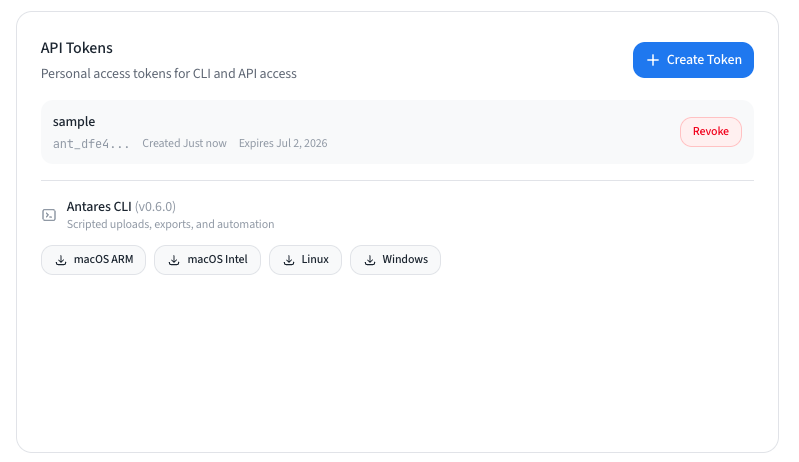
Download the CLI package that matches your operating system and processor:
| Platform | Use when |
|---|---|
| macOS ARM | You use a Mac with Apple Silicon. |
| macOS Intel | You use an older Intel-based Mac. |
| Linux | You run automation from a Linux workstation, VM, or CI runner. |
| Windows | You run automation from Windows. |
Configure the CLI
Section titled “Configure the CLI”The CLI uses this authentication priority:
--tokenANTARES_TOKEN- saved config
Run the interactive login flow:
antares auth loginOr configure a non-interactive environment:
export ANTARES_SERVER="https://app.getantares.io"export ANTARES_TOKEN="ant_your_token_here"
antares --server "$ANTARES_SERVER" auth status
The CLI stores saved credentials in the Antares config directory, such as ~/.config/antares/config.json on Linux.
CLI commands
Section titled “CLI commands”Use --human for readable terminal output. Without --human, commands return JSON where supported.
antares --server "$ANTARES_SERVER" --token "$ANTARES_TOKEN" --human analysis listAnalysis commands:
antares analysis listantares analysis get <id>antares analysis upload <file> [--wait]antares analysis wait <id> [--timeout 30m]antares analysis export <id> --format jsonantares analysis export <id> --format csvantares analysis export <id> --format xlsx --output analysis.xlsxantares analysis delete <id>
Report commands:
antares report overview <analysis-id>antares report workbook <analysis-id> <workbook-id>
Auth commands:
antares auth loginantares auth statusantares auth logout
Programmatic capabilities
Section titled “Programmatic capabilities”Personal access tokens are designed for analysis automation. Browser session authentication is required for token management and some administrative workflows.
Common automation capabilities include:
| Capability | What it supports |
|---|---|
| Authentication check | Verify that a token can reach the Antares tenant and identify the current user. |
| Analysis management | List analyses, inspect analysis status, upload a workbook, wait for completion, and delete analyses. |
| Report access | Read environment overview data and workbook-level report details. |
| Export | Export analysis results as JSON, CSV, or XLSX for downstream review. |
| CLI distribution | Download the platform-specific CLI package from the user profile. |
Browser workflows can also manage:
- Authentication and user profile.
- Personal access tokens.
- Tableau connections and pre-checks.
- Fabric connections, workspaces, semantic models, and imports.
- Conversions and deployment.
- Admin users, settings, audit logs, app logs, notifications, and operations.